Logo

Cylinder Head

earlbuddy

Regular Contributor
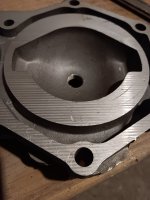
I'm gathering the parts to put on a NOS 1966 Evinrude/Johnson powerhead. I received this cylinder head yesterday. It has one small nick, not to deep. See pic. Will this be ok to use? The school I teach at has a technical school and the Auto Tech class is going to do the build. There are two boys that are interested in Marine Tech. The teacher is super excited for this project. I appreciate your input.
 
No photo…probably to large.
Resize your photos to under 1Mb
It can be done right from this site. See the little button at the bottom of where you type, the one that says ATTACH FILES?
When you click on it, you get the option to chose a file from “photo library”, or take a photo.
Once you chose one from the library that is already on your phone, (it will open your entire library), select the one you want. Now, before you do anything else, look at the bottom left corner- it will say OPTIONS.
Choose that & you get choices of LARGE, MED, SMALL. Try one, it will give the new size that will be attached. If it’s less than 1Mb, say 294Kb, then select DONE, then ADd, up at the top right
 
No photo…probably to large.
Resize your photos to under 1Mb
It can be done right from this site. See the little button at the bottom of where you type, the one that says ATTACH FILES?
When you click on it, you get the option to chose a file from “photo library”, or take a photo.
Once you chose one from the library that is already on your phone, (it will open your entire library), select the one you want. Now, before you do anything else, look at the bottom left corner- it will say OPTIONS.
Choose that & you get choices of LARGE, MED, SMALL. Try one, it will give the new size that will be attached. If it’s less than 1Mb, say 294Kb, then select DONE, then ADd, up at the top right
Options doesn't come up.
 
Ah ha! Sneaky little bastards!
My iPad did an update a few nights ago, & you have not gone senile, the OPTIONS button has disappeared!
Just try now, I ran into your problem. However, instead of “options”, (at least on an Apple product), touch the two little buttons that now appear on the bottom right. That produced the OPTIONS page.
I haven’t been able to find it using my phone, (Google pixel), you ignore be to resize using rd party ap, such as Franview.
 

Attachments

  • IMG_0799.jpeg
    IMG_0799.jpeg
    809.2 KB · Views: 23
Darn, ran out the clock on editing. Last sentence should read, you might have to resize using a third-party app as Ifran view.
 
Ah ha! Sneaky little bastards!
My iPad did an update a few nights ago, & you have not gone senile, the OPTIONS button has disappeared!
Just try now, I ran into your problem. However, instead of “options”, (at least on an Apple product), touch the two little buttons that now appear on the bottom right. That produced the OPTIONS page.
I haven’t been able to find it using my phone, (Google pixel), you ignore be to resize using rd party ap, such as Franview.
Darn, ran out the clock on editing. Last sentence should read, you might have to resize using a third-party app as Ifran view.
 

Attachments

  • 1.jpg
    1.jpg
    162.3 KB · Views: 37
Ah ha! Sneaky little bastards!
My iPad did an update a few nights ago, & you have not gone senile, the OPTIONS button has disappeared!
Just try now, I ran into your problem. However, instead of “options”, (at least on an Apple product), touch the two little buttons that now appear on the bottom right. That produced the OPTIONS page.
I haven’t been able to find it using my phone, (Google pixel), you ignore be to resize using rd party ap, such as Franview.
Appreciate you trying to help. I ended up getting credit on it and will find one without any nicks. Thanks again!
 
Back
Top